
This article provides clarity around the performance and limitations users will experience using the Weather API.
API Performance
In the Open Access Tier, API Performance can vary widely based on the number of users and the amount of data being requested. High request volume or requests for large amounts of data can increase API response times, as the resource pool is shared with all Open Access users.
In the Commercial Tier, there is a dedicated resource pool that scales to meet API request volume. The scaling pool allows for consistent performance and response times during periods of increased API traffic.
Number of Simultaneous Responses (concurrency)
The number of simultaneous responses are the number of concurrent requests that are processed by the Weather API at the same time. Our system allows up to 20 requests at a time, which by default are processed consecutively one at a time (concurrency of 1). If you have a concurrency of 5, then up to 5 requests can be processed at once.
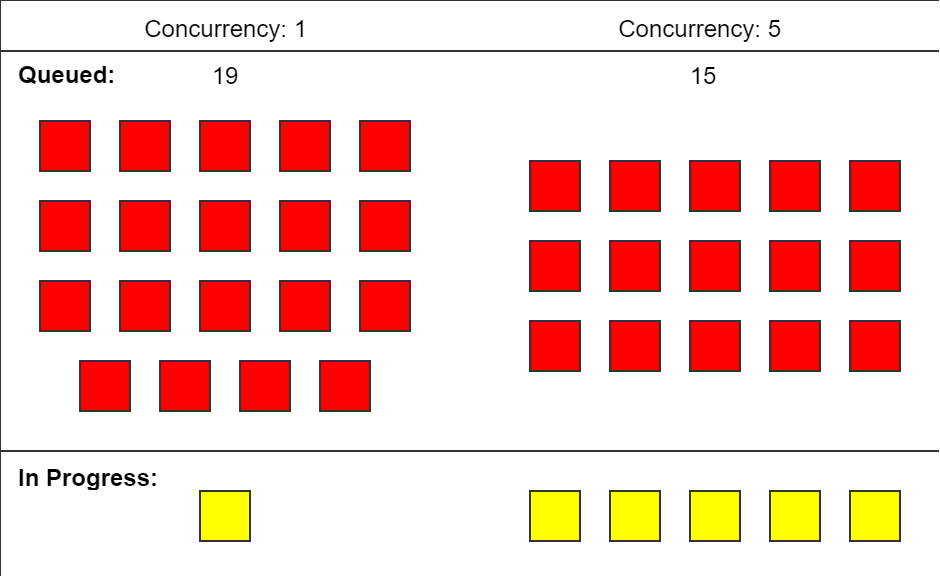
Example: If each request takes 1 second, and you have a concurrency of 1, it would take a total of 20 seconds to get back all of your 20 requests.
If each request takes 1 second, and you have a concurrency of 5, it would only take 4 seconds to get back all of your 20 requests.
Request Volume Limitations
All Weather API requests in the Timeseries and Nearest Time services are limited to 100,000 station-hours per request. A “station-hour” is calculated as (number of stations) x (number of hours in the requested time range). For example, requesting data from 5 stations for a single day represents (5x24)=120 station hours. If you exceed station-hour limits you will receive a response message such as "Querying too many station hours. 929139120.0 hours were requested."
The Latest service is limited to 75,000 stations, and does not allow open-ended requests for “all” stations. You must include a station selection parameter or the within parameter. If you exceed station limits you will receive a response message such as "Latest service requests are limited to 75000 stations. This request matched 96339 stations. Please narrow the request with station, network, country, state, bbox, radius, or a smaller within window."
The Statistics service is limited to 2 million station-hours. The Percentiles service is limited to 50,000 stations, with a specific limit for hourly percentiles (data=hourly) of 150,000 station-hours. The Precipitation service has request volume limits depending on the pmode used.
Please follow up with support@synopticdata.com if you are running into issues with request volume limitations and we can work with you to improve your request pattern.
General guidance for dealing with requests that are at a limit
There are numerous, reasonable request patterns which may result in exceeding these limitations. Sometimes you will exceed the limit when attempting to establish a query pattern. Other times the growth of the dataset available to you means that a query pattern which used to work now exceeds limits. In each of these cases the best practice is to monitor your usage if you are getting close and implement a form of pagination which makes sense for your usage model.
Monitoring your usage
Most query patterns include known durations, so you can use the period you are requesting - such as a 4 hour time series, and know that if your station set is approaching 25,000 stations, you may be at risk. Synoptic’s dataset grows substantially year over year, but depending on your access, data available to you may not (airport-only access will only grow ~1% each year, whereas resell networks can add 20-30% in a year).
Implementing a pagination strategy
There is no single pagination strategy recommended for accessing Weather API results. You will need to break up your request into chunks that will reliably stay below the limit, following the monitoring strategy discussed above. Some options available to you are:
-
Querying for specific stations - this gives you the maximum control. You can use the metadata service to identify the stations of interest, and then pass lists of stations up to your limit to get responses. There is no limit on the API’s query length, however your method of creating URLs may have limits.
-
Query by time - if you are making requests with a time dimension, and if your usage can handle it, you can split up your series by time. Note inclusivity of begin and end times from the documentation of the service you are using - but a full series can generally be reconstructed this way.
-
Spatial pagination is a straightforward, but tricky, way to divide usage. It is important to recognize the variation in area for various spatial zones (such as states) and variations in spatial density (ocean vs land) mean that simple spatial implementations may still be at risk if stations are not well distributed among your selections.
-
Bounding boxes - you can subdivide the spatial selection you have using BBOXes to ensure the number of stations in your selection is well below the limit.
-
Other spatial selectors - states, countries, counties, etc - You can develop strategies to use these, but you will experience difficulty getting even distribution of stations, and risk some of your queries still exceeding the limitations.
-
Utilize spatial thinning - this is designed for display applications, but can be configured to reduce the data you receive. You will receive only a subset of the data accessible to you in this method, but you can largely guarantee staying within a range of values in most cases.
-
Spatial Limitations
Depending on usage and tier level, certain spatial limitations may be placed on users and reflected within their API request output. These limitations are listed among the features for Open Access and Commercial tiers.
For example, an API user with access only to observations within Germany querying the Latest Service for Global METAR stations will not receive observations from any other European country outside Germany.
Historical Data Access
Similarly to Spatial Limitations, depending on usage and tier level, temporal limitations may be placed on users and reflected within their API request output. These limits are defined in years previous to the current time. These limitations are listed among the features for Open Access and Commercial tiers.
For example, an API user with 1 year of historical data access makes a Time Series request at 12:42 UTC on June 20th, 2023 for data spanning from January 1, 2000 to the current time. Within the API response, they would receive data from 12:42 UTC June 20th, 2022 until 12:42 UTC June 20th, 2023, excluding data before June 20th, 2022.
Consider your usage tier and contract settings if you notice potentially missing data for a successful request. Correctly formatted queries will only return data for active stations that are within contract-defined spatial and historical limits. If you see a response message such as "No stations found for this request, or your account does not have access to the requested station(s).", then either no data is available for the requested parameters, or the stations are not provisioned in your contract settings.